Subscribe to Educational Blog
Monetize Your website
Indonesian Advertisement
Photos Revenue Sharing
Paid for Downloads
Paid for Downloads
Text Link Ads
Text Link Ads
Paid for Reviews
Paid for Reviews
Paid for Link
Paid for Link
paid your Post
paid your Post

Free Blackberry Theme

Toraja Animated Background Wall For Blackberry

Anna Kournikova

Top 1 Atlets on Google Search
Anna Kournikova

Blackberry Tricks

How to take notes while talking on Blackberry
Blackberry Tricks

Blackberry Tips

Solutions of Blackberry Slow Browser
Blackberry Tips
free counters
Showing posts with label Battery life. Show all posts

SOLUTIONS secure connection, but the server's certificate is not trusted

Google
7:41 AM 0 Responses


Resolution:
 
  1. Download and install the latest BlackBerry Desktop Software.
  2. Enable Certificate Management in the BlackBerry Desktop Manager (Select Tools > Desktop options > check Use certificate synchronization > select OK).
  3. Connect the BlackBerry smartphone via USB and if prompted enter the smartphone password and Select OK.
  4. If prompted, select Get started with this device.
  5. Select don't add the account, then set any specific options and select Finish.
  6. Within the menu on the left, select Certificates.
  7. When prompted, type a key store password twice for confirmation and select OK.
     
    Note:
     Remember this password for future use.
     
  8. Select Root and type Thawte within the search box.
  9. Locate and add a check mark beside the Thawte Primary Root CA certificate and select Sync Certificates.
  10.  Once completed, restart the BlackBerry smartphone.
  11.  After the smartphone has powered back on, ensure it is connected to Wi-Fi and open BlackBerry Messenger.


Recent Updates : | Gallery | Tutorials | Animations for Blackberry Meesenger | Moslem | Music | Automotive | Wisdom Words | Chef Recipe | News | | Learning | Sports | About Love |

Monetize Your website Indonesian Advertisement Photos Revenue Sharing Paid for Downloads Text Link Ads Paid for Reviews Paid for Link paid your Post


Fadli Jabir|•dont forget to follow•|@fadli_Jabir

DOWLOADS Blackberry Launcher


For Mobile launcher visitor click Original Pages

Read more...

Follow And Stay Connected

Blackberry Link Contacts

Google
12:27 AM 0 Responses
After you’ve set up all your various accounts, you’ll notice that the same person, if they appear in multiple accounts, will be automatically merged together. If a contact with multiple entries doesn’t merge, you can manually link them together using the following tip:

Open the Contacts app

Tap and hold a contact you’d like to link together, e.g. Ty

Tap Select More

Tap the other contact you’d like to link, e.g. Ty Williams

Tap Link Contact from the menu


Recent Updates : | Gallery | Tutorials | Animations for Blackberry Meesenger | Moslem | Music | Automotive | Wisdom Words | Chef Recipe | News | | Learning | Sports | About Love |

Monetize Your website Indonesian Advertisement Photos Revenue Sharing Paid for Downloads Text Link Ads Paid for Reviews Paid for Link paid your Post


Fadli Jabir|•dont forget to follow•|@fadli_Jabir

DOWLOADS Blackberry Launcher


For Mobile launcher visitor click Original Pages

Read more...

Follow And Stay Connected

LONELY Blackberry Theme All Device

Google
10:30 PM 0 Responses


Make your loneliness joyfull with "Dark Lonely Theme" will help you make feel better dressed your Blackberry by Beautifull Animated wallpapper and colored with excellent quality patterns simplify designs, RESTART Your handset first after instalation for 100% Applied as Best friend to avoiding a potential new PARTNER

http://appworld.blackberry.com/webstore/content/27597509


Recent Updates : | Gallery | Tutorials | Animations for Blackberry Meesenger | Moslem | Music | Automotive | Wisdom Words | Chef Recipe | News | | Learning | Sports | About Love |


Monetize Your website Indonesian Advertisement Photos Revenue Sharing Paid for Downloads Text Link Ads Paid for Reviews Paid for Link paid your Post


Fadli Jabir|•dont forget to follow•|@fadli_Jabir

DOWLOADS Blackberry Launcher


For Mobile launcher visitor click Original Pages

Read more...

Follow And Stay Connected

Change Network Settings In Poor Coverage - to Maximize Your BlackBerry's Battery Life

Google
8:39 PM 0 Responses
This one not many people think of but it can also be a big help on the battery. If you happen to find yourself in an area with poor network coverage for your carrier, you can change up your settings or even turn off data completely and save yourself some precious battery bars. Sometimes when you find yourself in poor coverage it could be due to a clogged network (as happens often to the Crack Team at tradeshows or for those who are on AT&T in big cities like New York or San Francisco).

If this is the case, you can access your Network Settings and change your device from 3G/H+ down to 2G. This drops your "3G data" and gets you on the slower 2G network, but also clears things up as your device won't constantly struggle to find a data connection. It may sound a bit odd, but in times of need it definitely does the trick. Depending on your situation, this could literally add a day, never mind hours, to your battery life. Change your Network Settings to 2G:

Click on the Network Settings area on your home screen

Choose Networks and Connections > Mobile Network

Choose the dropdown box next to Network Mode and select 2G

Alternatively, you can totally disable data on your device by simply turning data services off in this same menu. Keep in mind this will kill all data to your device, so apps, emails, BBM and the like won't be received.

DOWLOADS Blackberry Launcher


"About Author" Copyright www.kabar.50webs.com

Fadli Jabir|•dont forget to follow•|@fadli_Jabir

Monetize Your website Indonesian Advertisement Photos Revenue Sharing Paid for Downloads Text Link Ads Paid for Reviews Paid for Link paid your Post


For Mobile launcher visitor click Original Pages

Read more...

Follow And Stay Connected

Turn Off Bluetooth When Not In Use - Tips & Tricks to Maximize Your BlackBerry's Battery Life

Google
8:26 PM 0 Responses

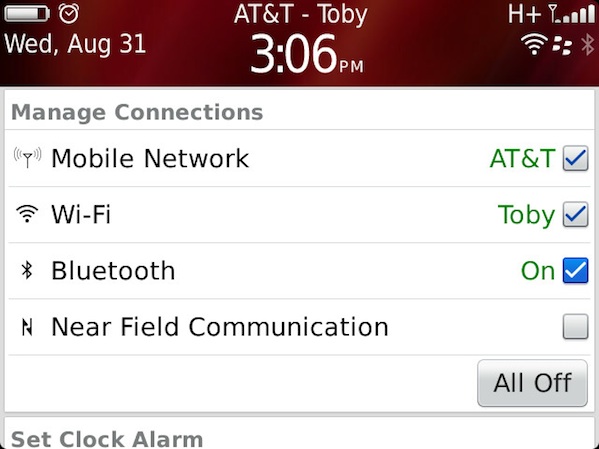
Bluetooth is a great feature of BlackBerry smartphones. It lets you connect with devices such as headsets, computers, speakers and much more. However when not in use, having Bluetooth active can slowly take away from your overall battery life. When you're not using Bluetooth it's always a good idea to just turn it off. Granted you won't be able to automatically connect to devices without turning it on again, but it's only a few clicks away so it's never too much of a hassle to fire it up again.

To Disable Bluetooth:

Click on the Network Settings area on your home screen

Uncheck Bluetooth (to enable Bluetooth repeat the steps but check the box)

As for Bluetooth while talking on the phone, the Crack team debates this one back and forth. Arguably you should get better BlackBerry life if you're on a call using a Bluetooth headset or Bluetooth Speakerphone (since you're now saving your BlackBerry from having to use it's microphone and speakers). Over the years we've found this can vary a bit depending, so it's something you'll want to test out with whatever Bluetooth Accessories you use. But for sure when you're not using Bluetooth, turn it off.


DOWLOADS Blackberry Launcher


Fadli Jabir|•dont forget to follow•|@fadli_Jabir

Monetize Your website Indonesian Advertisement Photos Revenue Sharing Paid for Downloads Text Link Ads Paid for Reviews Paid for Link paid your Post


For Mobile launcher visitor click Original Pages

Read more...

Follow And Stay Connected


Indonesian Tutorials

Enter your email address:

Delivered by FeedBurner


Indonesian Tutorials

Copy this code and drop on your web or blog page
Join to Our Pages Community on Google
Google+